


Nintendo GameCube controller

The Nintendo GameCube controller is the controller for Nintendo GameCube. It is somewhat in the vein of the Nintendo 64 controller, but it lacks the middle grip. While having the same buttons as its predecessor, the Nintendo GameCube controller moves the Z button onto the right shoulder, turns the L and R buttons into clickable analog triggers, and replaces the C buttons with an analog C-Stick for a much more ergonomic design where all buttons can be easily accessed.
Compatibility[edit]
The Nintendo GameCube controller is the only controller compatible with Super Smash Bros. Melee, as it was the default controller for Nintendo GameCube at the time of release.
Wii models with the model number RVL-001 are also compatible with the Nintendo GameCube controller, allowing Super Smash Bros. Brawl to be played using a Nintendo GameCube controller, and the Virtual Console release of Super Smash Bros. can also be played using the Nintendo GameCube controller. Certain third-party controllers for Nintendo GameCube are not recognized by Brawl. The Wii Family Edition and Wii Mini consoles do not support the Nintendo GameCube controller, as the hardware for backwards compatibility was removed. The Nintendo GameCube controller option still appears in-game since the software is programmed to support it, but only the Wii Remote–based control options can be used on Wii Family Edition and Wii Mini consoles. However, it is possible to solder Nintendo GameCube controller ports into non-RVL-001 Wii consoles because the motherboard still has the pads for it.
Wii U is compatible with the Nintendo GameCube controller through the use of an official adapter; however, it is only natively compatible with Super Smash Bros. for Wii U. The adapter uses a USB cable, which technically makes the Nintendo GameCube controller compatible with other devices like PC, although specific drivers may have to be installed to work properly. Additionally, a Nintendo GameCube controller was specifically made for SSB4, which is sold separately from the adapter unless a bundle is purchased.
Nintendo GameCube controller support is also available for Super Smash Bros. Ultimate. It requires the use of a USB adapter in the exact same manner as Super Smash Bros. for Wii U. Nintendo sells a USB adapter for Nintendo Switch, along with new Ultimate-themed Nintendo GameCube controllers. Unlike Wii U, Nintendo Switch recognizes the Nintendo GameCube controller as a Nintendo Switch Pro Controller, and thus all games that support the Pro Controller unofficially support the Nintendo GameCube controller by extension (rather than exclusively Super Smash Bros. series games). However, some games may not function well with the Nintendo GameCube controller due to it lacking buttons and gyro functions other Nintendo Switch–compatible controllers possess that may be required for gameplay purposes. Only a small number of games, such as Ultimate and the version of Super Mario Sunshine featured in Super Mario 3D All-Stars following an update, specifically detect it as a Nintendo GameCube controller and map buttons accordingly. The controller adapter, and Nintendo GameCube controllers by extension, are fully compatible with Nintendo Switch 2; this means that all controller configurations in Ultimate will work on that console. The Nintendo Switch 2 exclusive GameCube library as part of Nintendo Classics detect the adapter as a GameCube controller and map buttons accordingly.
Nintendo also sells a wireless Nintendo GameCube controller for Nintendo Switch 2 exclusively for Nintendo Switch Online members, which is specifically designed for playing the aforementioned Nintendo Classics in the same vein as previous wireless retro controllers. This controller can be also be used with other Nintendo Switch and Nintendo Switch 2 software, including Ultimate which specifically recognizes it as a Nintendo GameCube controller; however, this wireless controller can only be used on Nintendo Switch 2 and is not forward compatible with Nintendo Switch.
In Brawl, for Wii U, and Ultimate, the buttons on the Nintendo GameCube controller can be remapped in the Controls menu to perform other functions. Although the Nintendo GameCube controller is usually recognized as a Nintendo Switch Pro Controller on Nintendo Switch and Nintendo Switch 2, it cannot natively have custom button mapping via the system's settings as of Nintendo Switch system version 10.0.0.
In the case of Nintendo 3DS, it is impossible to natively use a Nintendo GameCube controller. However, it is possible to unofficially do so through modding, with the C-Stick fully supported if used in this way, even on non–New Nintendo 3DS consoles.[1] If played in this way, the controls can be mapped, albeit only through a Nintendo 3DS lens.
Standard controls[edit]


</gallery>
| Control | Action |
|---|---|
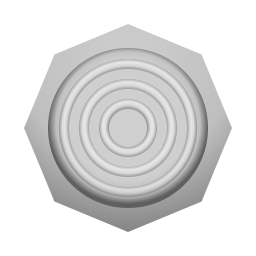 |
Move |
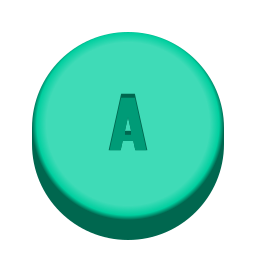 |
Standard attacks |
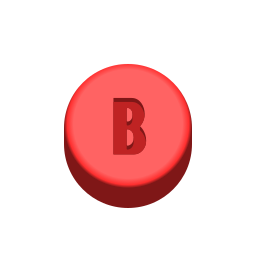 |
Special moves |
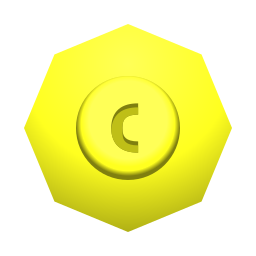 |
Stick-smash |
  |
Jump |
 |
Grab |
  |
Shield |
 |
Taunt (up-only in Melee) |
 |
Pause |
Super Smash Bros. (Virtual Console)[edit]
| Control | N64 equivalent | Action |
|---|---|---|
|
 |
Move |
|
 |
Standard attacks |
|
 |
Special moves |
|
 |
Jump |
|
 |
Grab |
|
 |
Shield |
|
 |
Taunt |
|
 |
Pause |
| Nothing |  |
Move the menu cursor |
Technical data[edit]
All buttons use rubber dome-switches, though the L and R triggers use a sliding potentiometer for analog control as well. Both analog sticks use potentiometers to measure the directional input.
Input lag[edit]
Nintendo GameCube controllers have the lowest latency of any Smash-related controller when used with Melee—albeit with high variance—experiencing lows of 44.25ms (2.5 frames) and highs of 75.91ms (4.5 frames). If used in Brawl, the latency increases to lows of 86.91ms (5.1 frames) and highs of 102.75 (6.1 frames). If used in SSB4 with the Nintendo GameCube controller adapter, it experiences lows of 69.53ms (4.1 frames) and highs of 88.7ms (5.2 frames). When used with a Nintendo GameCube controller adapter for Ultimate, however, the latency drastically increases, roughly doubling compared to Melee; it experiences lows of 87.86ms (5.1 frames) and highs of 109.53ms (6.5 frames).[2]
If a WaveBird wireless controller is used on the Channel 1 setting for Melee, the latency amounts to lows of 53.11ms (3.1 frames) and highs of 78.78ms (4.5 frames), leaving it outclassed by a wired controller in terms of latency.[3] If used in Brawl, this drastically increases, reaching lows of 92.28ms (5.5 frames) and highs of 106.45ms (6.2 frames). If used with SSB4, the latency is a bit lower, being about the same as the Wii U GamePad in the lower end of the spectrum; it experiences lows of 71.2ms (4.1 frames) and highs of 92.86ms (5.5 frames).
Software[edit]
.png)
Shoulder buttons[edit]
The sliding potentiometers of the shoulder triggers use values from 0 to 255. Values from 0 to 73 have no in-game effect at all. In Melee, values from 74 to 174 are inversely proportional to shield size. Values of 174 and higher produce the same shield size as digital presses, but only the digital press triggers techs and air dodges. In Brawl, only the digital press has any in-game effects, as the game ignores the analog values entirely. However, in Smash 4, the analog input is counted as a digital input, making the actual digital press of the shoulder buttons unnecessary.
Analog sticks[edit]
The Control Stick and C-Stick use two potentiometers that induce values from 0 to 255 with 128 being considered the center. An input of (0,0) would be diagonally down and left (225°). Values from 106 to 150 are generally considered neutral inputs and behave just like 128. In many player's states, this range expands even further. For example, during the standing animation (WAIT), y (vertical) values from 73 to 180 take no effect, while at the same x (horizontal) uses the standard neutral range (106-150).
Hardware[edit]
Analog sticks[edit]
The Control Stick and C-Stick make up the three most important parts: the stick itself, the stick box it is attached to, and the potentiometers the stick box is attached to. The shape of the stick box prevents the value extremes from being achieved, and the octagonal shape on the outer shell of the controller further cuts down the effective input range to approximately 25-230. This range varies from controller to controller and decreases with use as the friction between the inner stick box parts creates a gap and thus a loose zone. Because of this, a worn-down control stick will push the potentiometer less than a fresh control stick.
Screws[edit]
Standard Nintendo GameCube controllers use 2.5mm[4] tri-point screws.
Add-ons[edit]
GameCube Controller Adapter[edit]


First released in 2014 by Nintendo alongside Super Smash Bros. for Wii U, this adapter converts up to 4 GameCube controllers to USB, allowing them to connect with any device that supports USB connection. The adapter also possesses a second, grey USB connector that enables rumble, though this can connect to any power source to function. While the initial run of the adapter engraved the "Wii U" logo on its outer shell, subsequent reissues replace it with the generic "Nintendo" logo.
This adapter is notably the only way to use original GameCube Controllers on Nintendo consoles from the Wii U onward, as well as the closest to official method of connecting a Nintendo controller to hardware not developed by Nintendo currently available. While only For Wii U recognizes the adapter on Wii U, it is recognized system-wide on Nintendo Switch and Nintendo Switch 2, albeit as a Nintendo Switch Pro Controller to any game that isn't programmed to recognize the GameCube controller specifically.
As it is a simple adapter, a myriad of third-party alternatives exist that are either less expensive or have some kind of unique feature, although the build quality of these products are sometimes questionable and usually not on par with the quality of the first-party option.
Official/licensed variants[edit]
WaveBird Wireless Controller[edit]

Released in 2002 by Nintendo, the WaveBird emits radio frequencies which wirelessly connect to a receiver dongle inserted in the controller port, making it the first official wireless controller from Nintendo. Being wireless, the WaveBird allows for more freedom of movement for the player; either for better elbow room, or for sitting further from a setup.
To power, a WaveBird requires two AA batteries. The wireless range is 6 meters (though some have reported up to 21[5]) and uses RF communication, rather than the more common infrared method.[6] Its radio transceiver runs at 2.4 GHz. The wireless adapter used for the WaveBird has sixteen channels to connect controllers, allowing sixteen WaveBirds to be in the same given area. Unlike standard GameCube controllers, it lacks rumble feedback, likely to reduce battery consumption.
However, at best, the controller's input latency is a frame worse off compared to a wired controller, at 3.1 frames of delay. In later games, this almost increases, being 5.5 frames at best in Brawl and 4.4 frames when used with the GameCube controller adapter in later titles.[7] Furthermore, its wireless adapter, due to the channel system, is vulnerable to player interference. The latter issue has led to the WaveBird seeing some bans in large-scale tournament play, but does see play in local environments.
ASCII Keyboard Controller[edit]

ASCII Corporation partnered with Sega to release a special Nintendo GameCube controller with a built-in keyboard for the Nintendo GameCube release of Phantasy Star Online Episode I & II. This controller was released in 2002 in Japan only. However, the keyboard buttons are only compatible with that game and no others without modding.
PowerA GameCube Styled Controller[edit]
Released in 2018, this is technically not a Nintendo GameCube Controller, but instead essentially a Nintendo Switch Pro Controller with the basic layout of a Nintendo GameCube controller, but with the addition of all the buttons of said Pro controller. This "Nintendo GameCube controller" is wireless by default, but has a USB-C port to allow a wired connection.
Nintendo Switch Online Controller[edit]
Released on June 5th, 2025, this controller is technically not a Nintendo GameCube controller, but a Nintendo Switch 2 Pro Controller designed like one. This "Nintendo GameCube controller" has all the typical buttons, but with an added ZL button, Capture button, Home button, C Button, Sync button, built-in rumble, and a USB-C connector in place of the cord; it also features built-in motion controls, unlike the original controller. Being essentially a Nintendo Switch 2 Pro Controller, it is unofficially compatible with all games that support that controller; however, some games may not function well with the controller due to having fewer buttons than required for gameplay purposes. Only the collection of Nintendo GameCube games included as part of the Nintendo Switch Online Expansion Pack, as well as the version of Super Mario Sunshine in Super Mario 3D All-Stars following an update, detects it as a Nintendo GameCube controller and maps buttons accordingly.
Super Smash Bros. Ultimate supports the NSO GameCube controller as well. Still, despite the internals being practically similar to the Switch 2 Pro Controller, Ultimate treats it as if it were a GameCube controller, meaning the additional ZL button cannot be remapped. However, the additional buttons on the controller still function, making this controller a highly substantial solution to those who prefer the feel and layout of a GameCube controller while also having access to the system’s HOME and GameChat menus, in addition to being a wireless alternative to using an original controller through a USB adapter. [citation needed]
In competitive play[edit]
Due to Melee only releasing slightly over two months after the release of Nintendo GameCube, the official controller was the only viable option in the early tournament scene. This grew into the controller being the most popular in competitive Melee by far. This dominance continued into Brawl where, unlike the Nintendo 64 controller before it, the Wii had built-in Nintendo GameCube controller ports, allowing competitive players to continue using a controller they were already familiar with, which is further fueled with most alternative controllers (mainly as the Wii Remote and standard Classic Controller) being considered inferior. Similarly, the controller remained popular with SSB4 and Ultimate with the use of the official adapters. The fact that the controller was wired also naturally gave it less input lag compared to other options. Outside of official hardware, the Nintendo GameCube controller is still popular in other ways. Using the Raphnet Tech adapter, it is unofficially possible to use the Nintendo GameCube controller for Smash 64 and any other N64 game. The official USB Nintendo GameCube controller adapter can also be made compatible with PC hardware to use an official Nintendo GameCube controller on emulators without the need for specific drivers and technical knowledge.
Despite its popularity, the Nintendo GameCube controller is also known for being rather inconsistently manufactured; every Nintendo GameCube controller has slightly different calibrations and imperfections, which can cause differences between controller performance across microscopic distances. These discrepancies have caused issues particularly in competitive Melee, due to the game's more precise technical skill requirements and less forgiving input command system. On certain controllers, it is harder to angle the Control Stick in a precise direction, and certain techniques that require frame perfect inputs, such as dashbacks and shield dropping, are more difficult or impossible to perform on certain controllers. As a result, only a small percentage of all Nintendo GameCube controllers are considered usable for the highest level of play. Many professional Melee players use modified controllers with notches around the Control Stick, allowing them to more easily find the angles required to perform perfect wavedashes, shield angles, precise angles on Fox's and Falco's up special, and other advanced techniques.
Furthermore, the general fact that other alternatives are available naturally began putting a dent in its popularity, namely the Pro Controller variety introduced during the time of the Wii, which players began using in favor of the Nintendo GameCube controller due to their more favorable layout and better quality build. This, however, did not have a noticeable impact on the controller's popularity until SSB4 and especially Ultimate, as the Wii U and Nintendo Switch Pro Controllers are naturally compatible with their respective hardware, thus granting them more ease of access, whereas the Nintendo GameCube controller requires a specific adapter to use. As such, while still one of the most popular controllers at high-level play, many players also began preferring the use of other available alternatives in games after Melee to the point of the Nintendo GameCube controller generally no longer being considered the definitive gold standard in competitive play.
Since its launch, the Nintendo Switch 2 GameCube controller has entered the conversation as an attractive alternative to those who like the form factor of the GameCube controller, but don't want to deal with its limitations when being used for Ultimate like the lack of buttons and reliance on an adapter. Its USB connector has also caused many to prefer it over the original controller in terms of usage on other devices like a PC, as it can be connected directly to a device without an adapter to decrease input lag. However, its exclusivity to both the Nintendo Switch 2 and active Nintendo Switch Online subscribers makes this controller a rarity in tournaments for the time being.
Phob and Goomwave controllers[edit]
A new breed of modified Gamecube controllers would be created to solve stick calibration and production quality issues of standard stock Gamecube controllers, often referred to as OEMs to differentiate between the two. The most prominent of these are Phobs and Goomwaves, both designed for high level use in competitive play, primarily for Melee. These controllers, primarily phobs, would become endemic among high level smasher often replacing stock Gamecube controllers in competitive play. These controllers would have third party custom made motherboards designed to work in standard stock Gamecube shells with original software running them.
Goomwaves was the first of this type of competitive focused third party gamecube controllers, releasing in 2022. Goomwaves had initial success but would receive criticism from its closed sourced proprietary software that would later be reveal to have in-software adjustments in order to make certain advanced techniques easier and more consistent deemed beyond what is reasonably possible for OEMs, thus would result in Goomwaves being banned in the recommended Melee Controller Ruleset in 2024.
Phob controllers releasing in 2022 would be a counter to Goomwaves, with being open source non proprietary hardware and software. Phobs would gain popularity over Goomwaves reaching such high popularity among top competitors that Phobs have become more common than OEMs within the community. Phobs features digital snapback filtration, notch calibration, and complete immunity to potentiometer degradation through magnetic Hall effect sensors, among other features.
With the rise of these controllers, a cottage industry of vendors who build Phob controllers and add further Controller modifications formed, with some vendors focused on their local communities while others the wider community through Etsy or on their own websites. The cost of these controllers price range widely from 100-300+$ USD depending on additional modifications. These controllers face criticism due to the high price and "pay to win" nature with their advantages over stock OEMs. As such, recommended Melee Controller Ruleset was created to attempt to bring these controllers more in line with OEMs through standardized ruleset regulations.
Gallery[edit]
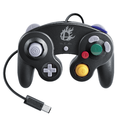 A Super Smash Bros. Edition Nintendo GameCube controller designed for Super Smash Bros. for Wii U.
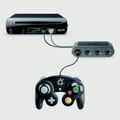 A GameCube controller connecting to a Wii U via the controller adapter.
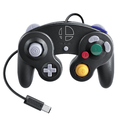 A Super Smash Bros. Edition Nintendo GameCube controller designed for Super Smash Bros. Ultimate.
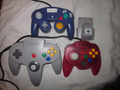 Size comparisons between an Nintendo 64 controller and its respective Rumble Pak, a Hori Mini Pad, and a Nintendo GameCube controller.
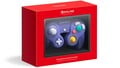 Nintendo Switch Online GameCube controller.


Trivia[edit]
- Super Smash Bros. for Nintendo 3DS is the only game in the series so far to not be natively compatible with the GameCube controller in any format.
- This means that no single controller type is officially compatible with every Smash game.
- Masahiro Sakurai stated in a YouTube video that he proposed replacing either the L button or R button on the Nintendo GameCube controller with a scroll wheel, as he believes that would be the ideal option for menu navigation.[8]
References[edit]
- ^ Nintendo GameCube controller mod for 3DS
- ^ Smash Controller Latency Article
- ^ Latency video
- ^ GUIDE: How to Open a Gamecube Controller - YouTube comment by Panda Hugs "Hi! What size is the triwing screwdriver that you used in the video? Thanks!" reply by zenith SSBM "2.5mm!"
- ^ WaveBird Review
- ^ WaveBird controller on Wikipedia
- ^ [1]
- ^ I Want to Choose Fast! [UI]
External links[edit]
| Controllers and buttons | |
|---|---|
| Nintendo 64 controller |
|
| Nintendo GameCube controller |
|
| Wii Remote (and Nunchuk) |           
|
| Classic Controller | LR       
|
| Nintendo 3DS |            
|
| Wii U GamePad / Wii U Pro Controller | L R R           
|
| Joy-Con / Joy-Con 2 |                 / GL button GR button / GL button GR button
|
| Nintendo Switch Pro Controller / Nintendo Switch 2 Pro Controller | LR / GL button GR button / GL button GR button
|
| Third-party controllers | Hori Mini Pad · Arcade controller · Keyboard |
| Other | Controls · Smash Controller · Controller modification |

